# Hermes Agent v0.16.0 (v2026.6.5)
**Release Date:** June 5, 2026
**Since v0.15.2:** 874 commits · 542 merged PRs · 1,962 files changed · 205,216 insertions · 46,217 deletions · 399 issues closed (2 P0, 62 P1, 16 security-tagged) · 170 community contributors (including co-authors)
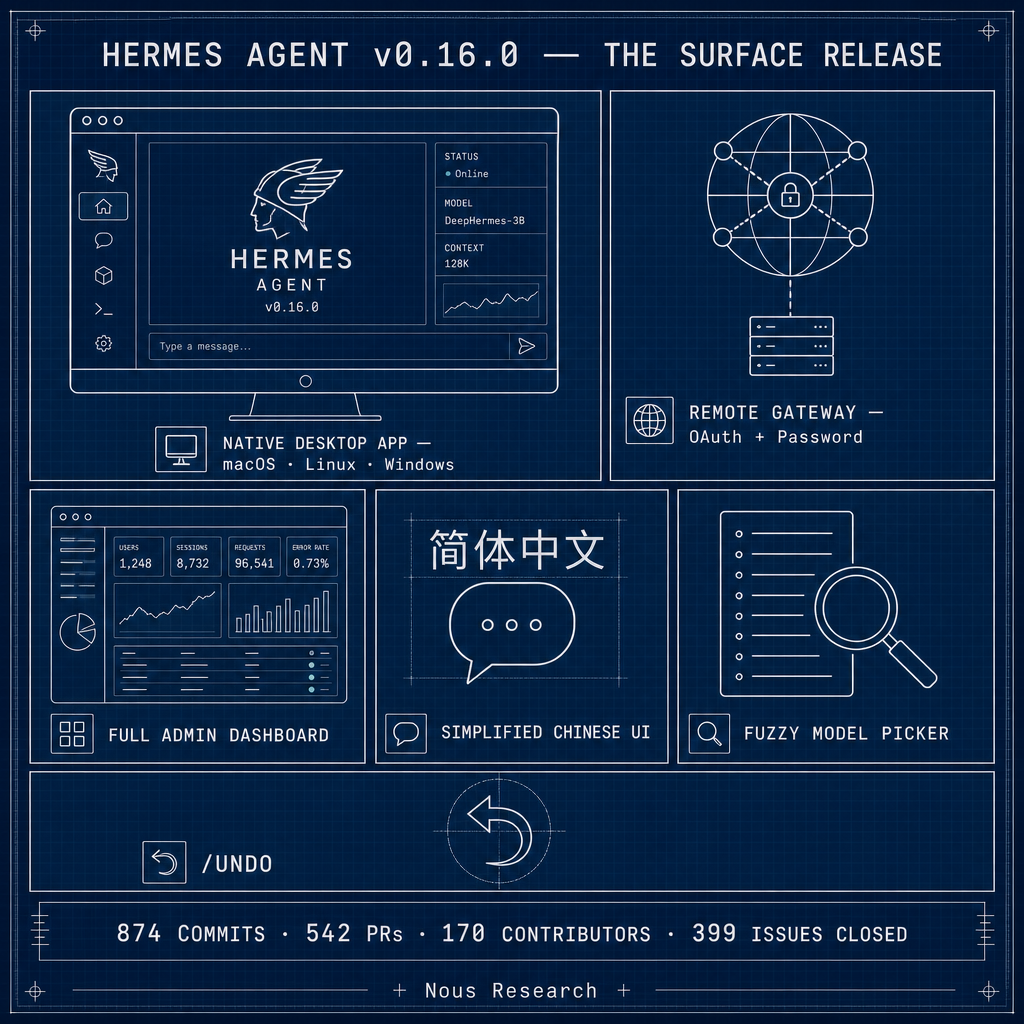
> **The Surface Release.** Hermes meets you wherever you work. A brand-new native desktop app — built across 100 PRs and 159 commits in a single week — gives you Hermes as a real macOS/Linux/Windows application: one-click install, in-app self-update, drag-and-drop files into chat, an inline model picker in the status bar, concurrent multi-profile sessions, a full Simplified Chinese translation, and the ability to connect to a remote Hermes gateway over OAuth or username/password. Alongside it, the web dashboard grew a full browser-based administration panel (MCP catalog, messaging channels, credentials, webhooks, memory, pluggable OIDC / username-password login), and first-time setup got a "Quick Setup via Nous Portal" path that gets you from install to first message in seconds. The default skill set was trimmed to what you actually need, NVIDIA/skills joined the trusted Skills Hub taps, the model picker is now fuzzy-searchable everywhere (desktop, web, TUI, CLI), and `/undo` finally lets you take back the last N turns. 2 P0 and 62 P1 closures ride along, plus a security round (CVE-2026-48710 Starlette pin, SSRF off-loop hardening, subprocess credential stripping).
---
## ✨ Highlights
- **Hermes Desktop — a real native app, not a terminal wrapper** — This is the headline. There's now a `apps/desktop/` Electron application that installs like any other desktop app on macOS, Linux, and Windows, updates itself in place from inside the app, and gives you a polished GUI for everything Hermes does. You get a proper chat window with streaming, a session list you can archive and search, drag-and-drop files anywhere in the chat area, clipboard image paste, a Cmd+K command palette, and a model picker right in the status bar. If you've been telling friends "it's a CLI agent" and watching their eyes glaze over — now you can just send them an installer. None of this existed a week ago. ([#20059](https://github.com/NousResearch/hermes-agent/pull/20059), [#35607](https://github.com/NousResearch/hermes-agent/pull/35607), [#37099](https://github.com/NousResearch/hermes-agent/pull/37099), [#37379](https://github.com/NousResearch/hermes-agent/pull/37379), [#38631](https://github.com/NousResearch/hermes-agent/pull/38631) — @OutThisLife, @jquesnelle, @ethernet8023, @austinpickett, @benbarclay)
- **Run the desktop app against a remote Hermes — sign in with OAuth or username/password** — The desktop app doesn't have to run Hermes locally. Point it at a remote Hermes gateway (your homelab, a hosted box, a teammate's server) and it connects over a secure WebSocket, authenticating with OAuth or a username/password login — no fiddling with `--insecure` flags or hand-copied session tokens. Each profile can target its own remote host, and you can run concurrent sessions across multiple profiles in one window with cross-profile `@session` links. The practical version: your laptop runs a thin GUI, the heavy agent runs wherever your API keys and compute live. ([#37888](https://github.com/NousResearch/hermes-agent/pull/37888), [#38851](https://github.com/NousResearch/hermes-agent/pull/38851), [#39330](https://github.com/NousResearch/hermes-agent/pull/39330), [#39778](https://github.com/NousResearch/hermes-agent/pull/39778) — @benbarclay, @OutThisLife, @teknium1)
- **The web dashboard is now a full admin panel — configure everything from the browser** — The dashboard grew from "view your sessions" into a complete administration surface. There's a Channels page that sets up every gateway messaging platform (Telegram, Discord, Slack, etc.) from the browser, an admin panel for the MCP catalog with enable/disable toggles, credential management, webhook and hook creation, memory configuration, gateway controls, and a System page with check-before-update and one-click Debug Share. You no longer have to SSH in and edit `config.yaml` to wire up a new messaging channel or MCP server — it's all point-and-click now. ([#36704](https://github.com/NousResearch/hermes-agent/pull/36704), [#36736](https://github.com/NousResearch/hermes-agent/pull/36736), [#37211](https://github.com/NousResearch/hermes-agent/pull/37211), [#38205](https://github.com/NousResearch/hermes-agent/pull/38205), [#38600](https://github.com/NousResearch/hermes-agent/pull/38600) — @teknium1)
- **Hermes Desktop speaks Simplified Chinese — full 简体中文 in the chat GUI** — The desktop app now ships a complete Simplified Chinese (简体中文) translation across every UI surface — the chat window itself, sidebar, settings, command center, cron, messaging, profiles, skills, agents, the lot. English stays the default; switch language in Appearance settings and the choice persists to your config (`display.language`). It's built on a proper typed i18n layer, so adding more languages from here is straightforward. ([#38241](https://github.com/NousResearch/hermes-agent/pull/38241) — @JimLiu)
- **Leaner default skill set — Hermes ships only what you actually need** — The bundled skill set got a deliberate trim. Skills that were redundant or dead are gone (`spotify` — superseded by the native Spotify plugin's 7 tools; `linear` — superseded by `hermes mcp install linear`; `kanban-codex-lane`, `debugging-hermes-tui-commands`, a stale `domain` orphan, and several empty category markers). Heavier or niche skills moved from bundled to optional (the Baoyu creative set, `dspy`, `subagent-driven-development`, `minecraft-modpack-server`, `pokemon-player`, `hermes-s6-container-supervision`) — still one `hermes skills install` away, just not loaded by default. And a new `environments:` relevance gate keeps context-specific skills (kanban, docker/s6) out of the skills index for users who'll never use them, while still loading them on explicit request. The result: a smaller, sharper default skill list, less noise in the picker, and a lighter prompt. The curator can now prune unused **built-in** skills too (not just agent-created ones), with usage tracked for every skill. ([#39028](https://github.com/NousResearch/hermes-agent/pull/39028), [#36701](https://github.com/NousResearch/hermes-agent/pull/36701), [#36228](https://github.com/NousResearch/hermes-agent/pull/36228) — @teknium1)
- **NVIDIA/skills is now a built-in trusted skills tap** — `NVIDIA/skills` joins OpenAI, Anthropic, and HuggingFace as a default trusted tap in the Skills Hub — discoverable, browsable, searchable, and auto-updating through the same pipeline. NVIDIA's verified skills for CUDA-X, AIQ, cuOpt and the rest of their product stack are one install away, with real category labels from the repo's `skills.sh.json` sidecar. ([#34333](https://github.com/NousResearch/hermes-agent/pull/34333) — @teknium1)
- **Quick Setup via Nous Portal — from install to first message in seconds** — First-time setup was thinned down to two clear paths: Quick Setup (sign in with Nous Portal, get a model picker, start chatting immediately) or Full Setup (the detailed wizard for power users). `hermes portal` is now the human-readable alias that runs the full quick-setup Nous flow. The first-run menu explains the difference inline so newcomers aren't guessing. The goal: a brand-new user shouldn't need to read docs to send their first message. ([#35723](https://github.com/NousResearch/hermes-agent/pull/35723), [#36227](https://github.com/NousResearch/hermes-agent/pull/36227), [#38449](https://github.com/NousResearch/hermes-agent/pull/38449), [#38465](https://github.com/NousResearch/hermes-agent/pull/38465) — @teknium1, @kshitijk4poor)
- **Fuzzy model picker, everywhere — type a few letters, find your model** — The model picker now does fuzzy search across the desktop app, web dashboard, TUI, and CLI. Type "v4fl" and `deepseek-v4-flash` surfaces; multi-endpoint providers are grouped under one row instead of cluttering the list with duplicates, and each row carries a description so you know what you're picking. The catalog refreshes hourly instead of daily, so new models show up the same day they launch. New this window: `deepseek-v4-flash`, `MiniMax-M3` with 1M context, `qwen3.7-plus`. ([#36928](https://github.com/NousResearch/hermes-agent/pull/36928), [#35227](https://github.com/NousResearch/hermes-agent/pull/35227), [#35756](https://github.com/NousResearch/hermes-agent/pull/35756), [#35659](https://github.com/NousResearch/hermes-agent/pull/35659), [#36214](https://github.com/NousResearch/hermes-agent/pull/36214) — @kshitijk4poor, @teknium1)
- **`/undo [N]` — take back the last N turns** — Said the wrong thing, or sent the agent down a bad path? `/undo` backs up N user turns, prefills your last message so you can edit and resend, and soft-deletes the turns in between. It works in the CLI, the TUI, and across messaging platforms (Telegram, Discord, etc.) with full parity. Closes a long-standing request ([#21910](https://github.com/NousResearch/hermes-agent/issues/21910)). ([#36229](https://github.com/NousResearch/hermes-agent/pull/36229), [#36699](https://github.com/NousResearch/hermes-agent/pull/36699) — @teknium1)
- **Choose your default interface — `cli` or `tui`** — You can now set whether `hermes chat` drops you into the classic CLI or the Ink TUI by default, with a `--cli` flag to override per-invocation. The TUI also got a single unified `/model` command and a Sessions overlay for switching between live sessions. Use the interface you actually like. ([#37782](https://github.com/NousResearch/hermes-agent/pull/37782), [#37112](https://github.com/NousResearch/hermes-agent/pull/37112) — @OutThisLife)
---
## 🖥️ Hermes Desktop App (NEW)
### Install & lifecycle
- macOS desktop install + in-app self-update; rebuild-and-relaunch cleanly on macOS ([#35607](https://github.com/NousResearch/hermes-agent/pull/35607), [#36198](https://github.com/NousResearch/hermes-agent/pull/36198), [#38296](https://github.com/NousResearch/hermes-agent/pull/38296) — @OutThisLife)
- macOS installer renamed to "Hermes" and turned into a launcher ([#37516](https://github.com/NousResearch/hermes-agent/pull/37516) — @OutThisLife)
- Build desktop in its own `desktop` stage on macOS/Linux instead of silently skipping; content-hash build stamp, `--build-only` / `--force-build` flags ([#36134](https://github.com/NousResearch/hermes-agent/pull/36134) — @OutThisLife, [#37597](https://github.com/NousResearch/hermes-agent/pull/37597) — @ethernet8023)
- Boot-failure recovery + live API-key validation; cancellable install; recover from corrupt cached Electron download ([#35864](https://github.com/NousResearch/hermes-agent/pull/35864), [#37379](https://github.com/NousResearch/hermes-agent/pull/37379), [#39032](https://github.com/NousResearch/hermes-agent/pull/39032) — @OutThisLife, @teknium1)
- Windows: recover from corrupt Electron cache in bootstrap install; stop racing our own backend during in-app update ([#39465](https://github.com/NousResearch/hermes-agent/pull/39465), [#39828](https://github.com/NousResearch/hermes-agent/pull/39828) — @teknium1, @OutThisLife)
- Linux: configure Electron sandbox helper; detect linux arm64 binary; disable GPU acceleration on remote displays to stop flicker ([#37691](https://github.com/NousResearch/hermes-agent/pull/37691), [#38594](https://github.com/NousResearch/hermes-agent/pull/38594), [#37932](https://github.com/NousResearch/hermes-agent/pull/37932) — @ethernet8023, @OutThisLife)
- Require Node ≥20.19/22.12 for the desktop build; zero eslint/typecheck debt + prettier pass ([#38255](https://github.com/NousResearch/hermes-agent/pull/38255), [#39100](https://github.com/NousResearch/hermes-agent/pull/39100) — @OutThisLife)
### Remote-gateway & multi-profile
- Connect to OAuth-gated remote gateways; username/password login for remote gateways; per-profile remote gateway hosts ([#37888](https://github.com/NousResearch/hermes-agent/pull/37888), [#38851](https://github.com/NousResearch/hermes-agent/pull/38851), [#39778](https://github.com/NousResearch/hermes-agent/pull/39778) — @benbarclay, @teknium1, @OutThisLife)
- Concurrent multi-profile sessions, cross-profile `@session` links; re-mint OAuth WS ticket on gateway reconnect; gate OAuth remote connect on AT-or-RT ([#39330](https://github.com/NousResearch/hermes-agent/pull/39330), [#38886](https://github.com/NousResearch/hermes-agent/pull/38886), [#39464](https://github.com/NousResearch/hermes-agent/pull/39464) — @OutThisLife, @teknium1, @benbarclay)
- Offer remote sign-in on a gated-gateway boot failure; validate live WebSocket in remote gateway test ([#39402](https://github.com/NousResearch/hermes-agent/pull/39402), [#39511](https://github.com/NousResearch/hermes-agent/pull/39511) — @teknium1)
### Chat UX & settings
- Drop files anywhere in the chat area; clipboard image paste with dedupe; attachments on Enter, IME composition handling ([#36262](https://github.com/NousResearch/hermes-agent/pull/36262), [#38306](https://github.com/NousResearch/hermes-agent/pull/38306), [#38677](https://github.com/NousResearch/hermes-agent/pull/38677) — @OutThisLife, @teknium1)
- Background needs-input indicator, clarify redesign, Cmd+K palette & UI consistency pass; inline model picker in the status bar; YOLO toggle in the status bar (TUI parity) ([#38631](https://github.com/NousResearch/hermes-agent/pull/38631), [#37738](https://github.com/NousResearch/hermes-agent/pull/37738), [#38517](https://github.com/NousResearch/hermes-agent/pull/38517) — @OutThisLife)
- Session-list overhaul, session hygiene/archive, media streaming + connecting overlay; search sessions by id (SQL-bounded) ([#37379](https://github.com/NousResearch/hermes-agent/pull/37379), [#37099](https://github.com/NousResearch/hermes-agent/pull/37099), [#39062](https://github.com/NousResearch/hermes-agent/pull/39062) — @OutThisLife, @teknium1)
- Dedicated Providers settings + polished Accounts/API-keys UX; consolidate skills + tools management into one pane; move model management into Settings ([#38551](https://github.com/NousResearch/hermes-agent/pull/38551) — @austinpickett, [#37310](https://github.com/NousResearch/hermes-agent/pull/37310), [#37330](https://github.com/NousResearch/hermes-agent/pull/37330) — @jquesnelle)
- Render approval/sudo/secret prompts so tools stop silently timing out; surface skill & quick-command slash commands in the palette; first-class xAI Grok OAuth provider in the launcher ([#38578](https://github.com/NousResearch/hermes-agent/pull/38578), [#38531](https://github.com/NousResearch/hermes-agent/pull/38531), [#37697](https://github.com/NousResearch/hermes-agent/pull/37697) — @teknium1, @OutThisLife)
- "Choose provider later" skip on first-run onboarding; onboarding can configure a local/custom endpoint without an API key; custom zoom shortcuts ([#39483](https://github.com/NousResearch/hermes-agent/pull/39483), [#38572](https://github.com/NousResearch/hermes-agent/pull/38572), [#37894](https://github.com/NousResearch/hermes-agent/pull/37894) — @teknium1, @ethernet8023)
- macOS helper microphone entitlement; scroll-jump fixes (native anchoring, at-rest jump, wheel-up snap-back); thinking block stays open mid-streaming ([#37745](https://github.com/NousResearch/hermes-agent/pull/37745) — @xxxigm, [#37866](https://github.com/NousResearch/hermes-agent/pull/37866), [#38221](https://github.com/NousResearch/hermes-agent/pull/38221), [#38809](https://github.com/NousResearch/hermes-agent/pull/38809) — @OutThisLife, @teknium1, @stremtec)
- GUI quality-of-life triage batch; salvaged AhmetArif0 desktop/dashboard fixes; rename session via `session.title` RPC so `/title` works ([#37536](https://github.com/NousResearch/hermes-agent/pull/37536) — @austinpickett, [#39070](https://github.com/NousResearch/hermes-agent/pull/39070), [#39410](https://github.com/NousResearch/hermes-agent/pull/39410) — @teknium1, @benbarclay)
- `hermes debug share` / `/debug` / `hermes logs` now include `desktop.log` ([#38203](https://github.com/NousResearch/hermes-agent/pull/38203) — @teknium1)
- **Simplified Chinese (简体中文) translation** across every desktop UI surface — typed i18n layer, switch in Appearance settings, persisted via `display.language` (English remains default) ([#38241](https://github.com/NousResearch/hermes-agent/pull/38241) — @JimLiu)
- Full multi-profile support over one global-remote dashboard; remote-profile sessions are first-class (resume, read, rename/archive/delete); new chats honor their profile in global-remote mode ([#39921](https://github.com/NousResearch/hermes-agent/pull/39921), [#39894](https://github.com/NousResearch/hermes-agent/pull/39894), [#39993](https://github.com/NousResearch/hermes-agent/pull/39993) — @OutThisLife)
## 📊 Web Dashboard
### Administration panel (NEW)
- Full administration panel — MCP catalog with enable/disable toggles, pairing, webhooks, credentials, memory, gateway, hook creation, system settings ([#36704](https://github.com/NousResearch/hermes-agent/pull/36704), [#36736](https://github.com/NousResearch/hermes-agent/pull/36736) — @teknium1)
- Channels page — set up every gateway messaging channel from the browser ([#37211](https://github.com/NousResearch/hermes-agent/pull/37211) — @teknium1)
- System page: check-before-update flow + Debug Share ([#38205](https://github.com/NousResearch/hermes-agent/pull/38205), [#38600](https://github.com/NousResearch/hermes-agent/pull/38600) — @teknium1)
- nous-blue theme, bulk sessions, schedule picker; enriched profiles dashboard + de-dupe channel env vars; configurable terminal background via theme ([#37383](https://github.com/NousResearch/hermes-agent/pull/37383), [#37872](https://github.com/NousResearch/hermes-agent/pull/37872) — @austinpickett, [#37156](https://github.com/NousResearch/hermes-agent/pull/37156) — @teknium1)
- Always enable embedded chat; remove dashboard `--tui` flag ([#38591](https://github.com/NousResearch/hermes-agent/pull/38591) — @benbarclay)
### Auth
- Pluggable username/password login (Option B); generic self-hosted OIDC provider + multi-provider verify fix; `hermes dashboard register` for self-hosted OAuth client ([#38819](https://github.com/NousResearch/hermes-agent/pull/38819) — @benbarclay, [#38917](https://github.com/NousResearch/hermes-agent/pull/38917), [#38802](https://github.com/NousResearch/hermes-agent/pull/38802) — @teknium1)
- Rotate dashboard sessions via refresh token; share `/api/*` public allowlist between legacy and OAuth gates; drop `/api/*` paths from OAuth `next=` round trip ([#37247](https://github.com/NousResearch/hermes-agent/pull/37247), [#34254](https://github.com/NousResearch/hermes-agent/pull/34254), [#36244](https://github.com/NousResearch/hermes-agent/pull/36244) — @benbarclay)
- Chat tab works in gated (OAuth) mode; trust non-web WS origins on OAuth-gated binds after ticket auth; authenticate server-spawned PTY child WS; sanction plugin WS/upload auth via SDK helpers ([#34793](https://github.com/NousResearch/hermes-agent/pull/34793), [#37870](https://github.com/NousResearch/hermes-agent/pull/37870), [#37972](https://github.com/NousResearch/hermes-agent/pull/37972), [#38549](https://github.com/NousResearch/hermes-agent/pull/38549) — @teknium1, @benbarclay, @kshitijk4poor)
- Allow desktop websocket origins on remote binds ([#37747](https://github.com/NousResearch/hermes-agent/pull/37747) — @teknium1)
## 🏗️ Core Agent & Architecture
### Provider & model support
- New models: `deepseek-v4-flash` (+ trimmed variants, maker-grouped curated lists), `MiniMax-M3` with 1M context on native minimax providers, `qwen3.7-plus` (Nous + OpenRouter), `gemini-3.5-flash` to Gemini OAuth + API-key pickers ([#35659](https://github.com/NousResearch/hermes-agent/pull/35659), [#36214](https://github.com/NousResearch/hermes-agent/pull/36214), [#39409](https://github.com/NousResearch/hermes-agent/pull/39409), [#37046](https://github.com/NousResearch/hermes-agent/pull/37046) — @teknium1)
- Model picker: fuzzy search across WebUI/TUI/CLI; group multi-endpoint providers under one row; refresh provider descriptions + describe grouped rows; refresh catalog hourly; stop routing OpenAI selection to OpenRouter ([#36928](https://github.com/NousResearch/hermes-agent/pull/36928) — @kshitijk4poor, [#35227](https://github.com/NousResearch/hermes-agent/pull/35227), [#35773](https://github.com/NousResearch/hermes-agent/pull/35773), [#35756](https://github.com/NousResearch/hermes-agent/pull/35756), [#37175](https://github.com/NousResearch/hermes-agent/pull/37175))
- Always show Nous Tool Gateway backends, login on select; surface the Nous free tool pool (entitlement + setup prompt); route FAL video gen through managed Nous gateway ([#35792](https://github.com/NousResearch/hermes-agent/pull/35792) — @teknium1, [#36153](https://github.com/NousResearch/hermes-agent/pull/36153), [#33259](https://github.com/NousResearch/hermes-agent/pull/33259) — @alt-glitch)
- Persist mid-session model switch to database; recover model on post-interrupt recovery turn ([#35256](https://github.com/NousResearch/hermes-agent/pull/35256), [#35381](https://github.com/NousResearch/hermes-agent/pull/35381) — @teknium1)
- Credential pool: `STATUS_DEAD` for terminal OAuth failures; isolate custom provider picker credentials ([#34412](https://github.com/NousResearch/hermes-agent/pull/34412), [#34810](https://github.com/NousResearch/hermes-agent/pull/34810) — @teknium1)
- Disable Nous Portal legacy session-key inference fallback — JWT-only ([#34508](https://github.com/NousResearch/hermes-agent/pull/34508) — @kshitijk4poor)
### Agent loop, prompt & tools
- `/undo [N]` — backs up N user turns with prefill + soft-delete (CLI/TUI + messaging-platform parity) ([#36229](https://github.com/NousResearch/hermes-agent/pull/36229), [#36699](https://github.com/NousResearch/hermes-agent/pull/36699) — @teknium1)
- Progressive tool disclosure for MCP and plugin tools (scoped); embedder environment-hint hook for the system prompt; universal task-completion guidance + local Python toolchain probe ([#34493](https://github.com/NousResearch/hermes-agent/pull/34493), [#34574](https://github.com/NousResearch/hermes-agent/pull/34574), [#34340](https://github.com/NousResearch/hermes-agent/pull/34340) — @teknium1)
- Uncap delegation `max_spawn_depth` (floor 1, no ceiling); broaden Hermes self-knowledge pointer to docs + skill; `hermes prompt-size` diagnostic ([#39772](https://github.com/NousResearch/hermes-agent/pull/39772), [#38538](https://github.com/NousResearch/hermes-agent/pull/38538), [#35276](https://github.com/NousResearch/hermes-agent/pull/35276) — @teknium1)
- `perf(read_file)`: compact line-number gutter — ~14% fewer tokens per read (now the only format) ([#35368](https://github.com/NousResearch/hermes-agent/pull/35368), [#35532](https://github.com/NousResearch/hermes-agent/pull/35532) — @teknium1)
- Resolve agent cwd from `TERMINAL_CWD` via one reader; align prefill messages key handling; resume relaunches in the session's original working directory ([#35028](https://github.com/NousResearch/hermes-agent/pull/35028) — @banditburai, [#38760](https://github.com/NousResearch/hermes-agent/pull/38760) — @helix4u, [#38562](https://github.com/NousResearch/hermes-agent/pull/38562) — @teknium1)
- Prevent session-id fork from concurrent compressions; observer telemetry hooks + NeMo-Relay plugin (gated tool emit) ([#34351](https://github.com/NousResearch/hermes-agent/pull/34351), [#38232](https://github.com/NousResearch/hermes-agent/pull/38232) — @teknium1)
### Sessions, state & memory
- `perf(state)`: merge FTS5 segments on VACUUM + `hermes sessions optimize`; keep `/branch` sessions visible after parent reopen; survive missing FTS5 runtimes ([#34596](https://github.com/NousResearch/hermes-agent/pull/34596), [#39214](https://github.com/NousResearch/hermes-agent/pull/39214) — @teknium1, @kshitijk4poor, [#35452](https://github.com/NousResearch/hermes-agent/pull/35452) — @helix4u)
- Honcho: make startup fail open; harden self-hosted setup paths ([#24847](https://github.com/NousResearch/hermes-agent/pull/24847) — @stephenschoettler, [#35170](https://github.com/NousResearch/hermes-agent/pull/35170) — @kshitijk4poor)
- Supermemory: session-level ingest + kebab aliases ([#38756](https://github.com/NousResearch/hermes-agent/pull/38756) — @alt-glitch)
## 🧩 Multi-Agent (Kanban) & Skills
### Kanban
- `goal_mode` cards run workers in a `/goal` loop; file attachments on tasks; attach images referenced in task bodies to worker vision ([#35710](https://github.com/NousResearch/hermes-agent/pull/35710), [#35395](https://github.com/NousResearch/hermes-agent/pull/35395), [#34210](https://github.com/NousResearch/hermes-agent/pull/34210) — @teknium1)
- `default_assignee` fallback + per-profile concurrency cap; `POST /runs/{run_id}/terminate` endpoint; gate notifier watcher on `dispatch_in_gateway` ([#34244](https://github.com/NousResearch/hermes-agent/pull/34244), [#34449](https://github.com/NousResearch/hermes-agent/pull/34449), [#37174](https://github.com/NousResearch/hermes-agent/pull/37174) — @teknium1)
- CLI dispatch config passthrough + humanizer skill swap ([#34337](https://github.com/NousResearch/hermes-agent/pull/34337) — @teknium1)
### Skills
- **Leaner default skill set** ([#39028](https://github.com/NousResearch/hermes-agent/pull/39028) — @teknium1):
- Removed (redundant / dead): `spotify` (→ Spotify plugin's 7 native tools), `linear` (→ `hermes mcp install linear`), `kanban-codex-lane`, `debugging-hermes-tui-commands`, stale `domain` orphan, empty category markers (`diagramming`, `gifs`, `inference-sh`, `mlops/training`, `mlops/vector-databases`)
- Bundled → optional: `baoyu-article-illustrator`, `baoyu-comic`, `creative-ideation`, `pixel-art`, `dspy`, `subagent-driven-development`, `minecraft-modpack-server`, `pokemon-player`, `hermes-s6-container-supervision`
- Consolidated: `webhook-subscriptions` + `native-mcp` folded into the `hermes-agent` skill as on-demand references; `writing-plans` merged into `plan` (v2.0.0)
- New `environments:` frontmatter relevance gate (`kanban` / `docker` / `s6`) — context-specific skills stop appearing in the index for users who won't use them, still load on explicit request
- Curator can now prune unused **built-in** skills (not just agent-created), with usage tracked for every skill ([#36701](https://github.com/NousResearch/hermes-agent/pull/36701) — @teknium1)
- Blank-slate skills — `install --no-skills` + opt-out/opt-in for the default profile ([#36228](https://github.com/NousResearch/hermes-agent/pull/36228) — @teknium1)
- **NVIDIA/skills trusted tap** — `NVIDIA/skills` is now a default trusted Skills Hub tap alongside OpenAI/Anthropic/HuggingFace; `skills.sh.json` sidecar gives taps real category labels ([#34333](https://github.com/NousResearch/hermes-agent/pull/34333) — @teknium1)
- Skills Hub: fix browse cap, add source links + copy buttons + category cleanup ([#37143](https://github.com/NousResearch/hermes-agent/pull/37143) — @teknium1)
- New optional skills: `grok` (xAI Grok Build CLI), `antigravity-cli` operator (under autonomous-ai-agents) ([#34582](https://github.com/NousResearch/hermes-agent/pull/34582), [#34583](https://github.com/NousResearch/hermes-agent/pull/34583), [#34604](https://github.com/NousResearch/hermes-agent/pull/34604) — @teknium1)
## 📱 Messaging Platforms (Gateway)
- Structured stream-event protocol + Telegram draft formatting parity; per-platform streaming defaults (Telegram on, Discord off) + dashboard toggles; surface gateway streaming block in `DEFAULT_CONFIG` ([#37250](https://github.com/NousResearch/hermes-agent/pull/37250), [#37303](https://github.com/NousResearch/hermes-agent/pull/37303), [#37285](https://github.com/NousResearch/hermes-agent/pull/37285) — @teknium1)
- Discord voice-channel mixer — ambient idle bed + verbal acks that overlap TTS; explain `/voice` usage when toggled bare ([#39659](https://github.com/NousResearch/hermes-agent/pull/39659), [#39766](https://github.com/NousResearch/hermes-agent/pull/39766) — @teknium1)
- Handle Feishu meeting invitations; bluebubbles group mention gating; matrix bang-command aliases; matrix fail-closed approval reaction auth ([#39040](https://github.com/NousResearch/hermes-agent/pull/39040), [#37091](https://github.com/NousResearch/hermes-agent/pull/37091), [#38175](https://github.com/NousResearch/hermes-agent/pull/38175) — @teknium1, @alt-glitch, [#34567](https://github.com/NousResearch/hermes-agent/pull/34567))
- Clean service restart flow; close ResponseStore + dispose unowned adapter on reconnect failure; weixin `asyncio.wait_for` timeouts ([#36188](https://github.com/NousResearch/hermes-agent/pull/36188) — @helix4u, [#37679](https://github.com/NousResearch/hermes-agent/pull/37679) — @Fearvox, [#35117](https://github.com/NousResearch/hermes-agent/pull/35117) — @banditburai)
## 🖥️ CLI, TUI & Setup
- Configurable default interface (cli vs tui) + `--cli` flag; TUI single `/model` command + unified Sessions overlay; nudge toward `/agents` dashboard when delegation starts ([#37782](https://github.com/NousResearch/hermes-agent/pull/37782), [#37112](https://github.com/NousResearch/hermes-agent/pull/37112) — @OutThisLife, [#34704](https://github.com/NousResearch/hermes-agent/pull/34704) — @kshitijk4poor)
- Thin out setup — Quick Setup via Nous Portal + Full Setup defaults; explain Quick vs Full inline; `hermes portal` human-readable Portal onboarding alias + full quick-setup Nous flow ([#35723](https://github.com/NousResearch/hermes-agent/pull/35723), [#36227](https://github.com/NousResearch/hermes-agent/pull/36227), [#38449](https://github.com/NousResearch/hermes-agent/pull/38449), [#38465](https://github.com/NousResearch/hermes-agent/pull/38465) — @teknium1, @kshitijk4poor)
- Set process title to `hermes` in ps/top/htop; warn on unsupported pip installs + fix stale update-check cache ([#35143](https://github.com/NousResearch/hermes-agent/pull/35143), [#34846](https://github.com/NousResearch/hermes-agent/pull/34846) — @teknium1)
- TUI perf: stop slow/dead MCP servers from freezing startup; stop eager MCP discovery from blocking agent-capable startup; stop persisting full tool output in trail lines (silent OOM) ([#35273](https://github.com/NousResearch/hermes-agent/pull/35273), [#35397](https://github.com/NousResearch/hermes-agent/pull/35397), [#38224](https://github.com/NousResearch/hermes-agent/pull/38224) — @teknium1)
- TUI fixes: auto-recover session on unexpected gateway death; reassemble split SGR mouse sequences; preserve UTF-8 in PowerShell clipboard; reset terminal input modes on exit; `/save` snapshots under Hermes home ([#35893](https://github.com/NousResearch/hermes-agent/pull/35893), [#38564](https://github.com/NousResearch/hermes-agent/pull/38564) — @OutThisLife, [#35222](https://github.com/NousResearch/hermes-agent/pull/35222) — @teknium1, [#36864](https://github.com/NousResearch/hermes-agent/pull/36864) — @maxmilian, [#38251](https://github.com/NousResearch/hermes-agent/pull/38251) — @austinpickett)
- Setup model/provider pickers migrated off `simple_term_menu` to curses (ESC + ghost-row fixes); default browser/TTS picker to free local backend, not paid Nous ([#35806](https://github.com/NousResearch/hermes-agent/pull/35806), [#37800](https://github.com/NousResearch/hermes-agent/pull/37800) — @teknium1)
## 🔧 Tool System & Installer
- `single managed-uv path`, delete fts5 installer escalation; installer commit pinning opt-in (default branch-follow); shallow clones ([#37660](https://github.com/NousResearch/hermes-agent/pull/37660) — @ethernet8023, [#37123](https://github.com/NousResearch/hermes-agent/pull/37123) — @jquesnelle, [#39423](https://github.com/NousResearch/hermes-agent/pull/39423) — @ethernet8023)
- `ensure_uv()` survives the update boundary (no first-run crash); harden venv rebuild + verify core deps after install; require managed marker before destructive clean; stash/restore by default for non-interactive updates ([#39780](https://github.com/NousResearch/hermes-agent/pull/39780) — @OutThisLife, [#38887](https://github.com/NousResearch/hermes-agent/pull/38887), [#39568](https://github.com/NousResearch/hermes-agent/pull/39568), [#39645](https://github.com/NousResearch/hermes-agent/pull/39645) — @teknium1, @helix4u)
- MCP: stop reporting false OAuth success when no token was obtained; vision honors `model.supports_vision` in `vision_analyze` + `browser_vision`; MiniMax t2a_v2 TTS `raise_for_status` ([#34807](https://github.com/NousResearch/hermes-agent/pull/34807), [#34562](https://github.com/NousResearch/hermes-agent/pull/34562), [#39057](https://github.com/NousResearch/hermes-agent/pull/39057) — @teknium1)
- yuanbao: cache resolved media resources by resourceId ([#34474](https://github.com/NousResearch/hermes-agent/pull/34474) — @teknium1)
## 🐳 Docker & Deployment
- Container reuse + bounded-sync cleanup + orphan reaper; auto-join Docker socket group for docker-in-docker backend; boot non-root containers (skip s6-setuidgid drop when already unprivileged) ([#33645](https://github.com/NousResearch/hermes-agent/pull/33645), [#34407](https://github.com/NousResearch/hermes-agent/pull/34407) — @benbarclay, [#34837](https://github.com/NousResearch/hermes-agent/pull/34837) — @IAvecilla)
- Skip unnecessary boot chown when volume ownership matches remapped UID; seed `gateway_state.json` from `HERMES_GATEWAY_BOOTSTRAP_STATE` on first boot; tag containers with hermes-agent labels for identification ([#35027](https://github.com/NousResearch/hermes-agent/pull/35027) — @Foldblade, [#37896](https://github.com/NousResearch/hermes-agent/pull/37896) — @benbarclay)
- Point TUI launcher at prebuilt bundle via `HERMES_TUI_DIR`; consolidate node/nix workspace lockfile + update all consumers ([#37923](https://github.com/NousResearch/hermes-agent/pull/37923), [#36171](https://github.com/NousResearch/hermes-agent/pull/36171) — @benbarclay, @ethernet8023)
## 🔒 Security & Reliability
- **CVE-2026-48710 (Starlette BadHost)** — pin patched Starlette ≥1.0.1 ([#35118](https://github.com/NousResearch/hermes-agent/pull/35118) — @teknium1)
- Run URL SSRF checks off the event loop in async paths; strip Bedrock inference bearer token from subprocess env; add `bws_cache.json` to file-safety read guard; neutralize file paths in mutation-verifier footer ([#39046](https://github.com/NousResearch/hermes-agent/pull/39046), [#34498](https://github.com/NousResearch/hermes-agent/pull/34498), [#34421](https://github.com/NousResearch/hermes-agent/pull/34421), [#35684](https://github.com/NousResearch/hermes-agent/pull/35684) — @teknium1)
- Restore approval/sudo context in `execute_code` + guard entry points; add docker restart/stop/kill to `DANGEROUS_PATTERNS`; sanitize invisible unicode in vetted skill content; deepcopy tools before in-place xAI mutation ([#34497](https://github.com/NousResearch/hermes-agent/pull/34497), [#33438](https://github.com/NousResearch/hermes-agent/pull/33438) — @teknium1, @Sarbai, [#37245](https://github.com/NousResearch/hermes-agent/pull/37245), [#34416](https://github.com/NousResearch/hermes-agent/pull/34416))
- Sandbox-mirror soft guard for writes to per-task `.hermes` mirrors; honcho fail-open on startup ([#32213](https://github.com/NousResearch/hermes-agent/pull/32213) — @briandevans, [#24847](https://github.com/NousResearch/hermes-agent/pull/24847) — @stephenschoettler)
## 🐛 Notable Bug Fixes
- **399 issues closed** this window (2 P0, 62 P1, 16 security-tagged, 262 bug-labeled).
- Desktop: keep in-flight new chats from vanishing on refresh; Stop button actually interrupts when a turn is queued; stop background session messages bleeding into the active transcript; slash/@ completion menu navigable & Esc-dismissable; IME Enter no longer splits messages ([#37908](https://github.com/NousResearch/hermes-agent/pull/37908) — @OutThisLife, [#37948](https://github.com/NousResearch/hermes-agent/pull/37948), [#37975](https://github.com/NousResearch/hermes-agent/pull/37975), [#37937](https://github.com/NousResearch/hermes-agent/pull/37937) — @kshitijk4poor, [#38333](https://github.com/NousResearch/hermes-agent/pull/38333) — @stremtec)
- Update: stop stash/restore from clobbering desktop source on managed clones; don't fail desktop rebuild/skills sync on mid-rebuild venv; export launcher virtualenv to uv ([#38542](https://github.com/NousResearch/hermes-agent/pull/38542), [#38885](https://github.com/NousResearch/hermes-agent/pull/38885), [#35224](https://github.com/NousResearch/hermes-agent/pull/35224) — @teknium1)
- Voice: honor `PIPEWIRE_REMOTE` in PortAudio fallback; allow `/voice` over SSH when a sound server is reachable; restore mistralai (2.4.8 clean, ban lifted) ([#33473](https://github.com/NousResearch/hermes-agent/pull/33473) — @Dusk1e, [#35719](https://github.com/NousResearch/hermes-agent/pull/35719), [#34841](https://github.com/NousResearch/hermes-agent/pull/34841) — @teknium1)
## 📚 Documentation
- New Desktop App guide + remote-backend sections (session token, `--tui` requirement, username/password connect, dashboard/gateway prerequisites) ([#37457](https://github.com/NousResearch/hermes-agent/pull/37457), [#38144](https://github.com/NousResearch/hermes-agent/pull/38144), [#38180](https://github.com/NousResearch/hermes-agent/pull/38180), [#38534](https://github.com/NousResearch/hermes-agent/pull/38534), [#39128](https://github.com/NousResearch/hermes-agent/pull/39128) — @teknium1)
- Dashboard auth-provider suitability + registration across dashboard/Docker/Desktop; network egress isolation guide for Docker ([#39633](https://github.com/NousResearch/hermes-agent/pull/39633) — @benbarclay, [#26385](https://github.com/NousResearch/hermes-agent/pull/26385) — @Manzela)
---
## 👥 Contributors
A huge thank-you to the **170 community contributors** (including co-authors) who shipped work in this release.
### Core
- @teknium1
### Top community contributors (by merged-PR count)
- **@OutThisLife** (52) — built the desktop app end to end: install, self-update, remote-gateway connect, multi-profile sessions, chat UX, status-bar model picker
- **@benbarclay** (44) — Docker hardening, dashboard auth (OIDC, username/password, refresh-token rotation), desktop OAuth remote connect
- **@kshitijk4poor** (29) — fuzzy model picker, setup/portal onboarding, desktop completion-menu & Stop-button fixes, honcho hardening
- **@ethernet8023** (18) — desktop build pipeline (content-hash stamp, build flags), Linux/arm64 desktop support, managed-uv consolidation
- **@austinpickett** (8) — dashboard nous-blue theme + bulk sessions, desktop Providers settings, GUI QoL triage
- **@alt-glitch** (7) — Nous tool-pool entitlement surfacing, FAL video-gen managed gateway, supermemory session ingest, matrix aliases
- **@helix4u** (6) — gateway service-restart flow, update destructive-clean guard, config prefill alignment
- **@jquesnelle** (4) — installer commit-pinning opt-in, desktop skills/tools + model-management consolidation
- **@JimLiu** — full Simplified Chinese (简体中文) desktop translation + typed i18n layer
### All Contributors
@0xharryriddle, @a1245582339, @adybag14-cyber, @AhmetArif0, @alaamohanad169-ship-it, @alelpoan, @alt-glitch,
@Aman113114-IITD, @amathxbt, @aminvakil, @annguyenNous, @aqilaziz, @Archerouyang, @ashishpatel26, @asimons81,
@austinpickett, @banditburai, @baofuen, @Bartok9, @bbednarski9, @beardthelion, @bedirhancode, @benbarclay,
@benfrank241, @blackpilledsoftware-prog, @bluefishs, @brian-doherty, @briancl2, @briandevans, @BROCCOLO1D,
@caojiguang, @CharZhou, @counterposition, @coygeek, @CryptoByz, @davetist, @davidgut1982, @dchenk, @dirtyren,
@donovan-yohan, @dparikh79, @dskwe, @Dusk1e, @dvir-pashut, @EloquentBrush0x, @emozilla, @ErnestHysa, @Erosika,
@ethernet8023, @f3rs3n, @faisfamilytravel, @Fearvox, @ferminquant, @fesalfayed, @firefly, @flooryyyy,
@Foldblade, @Frowtek, @gbarany, @Glucksberg, @GodsBoy, @haran2001, @harjothkhara, @HashClawAI, @hayka-pacha,
@helix4u, @HeLLGURD, @Hinotoi-agent, @hllqkb, @IAvecilla, @inchargeautomation-lab, @Interstellar-code, @isair,
@ITheEqualizer, @jeffrobodie-glitch, @JezzaHehn, @JimLiu, @Julientalbot, @julio-cloudvisor, @karmeleon,
@Kenmege, @Kewe63, @Kolektori, @konsisumer, @kshitijk4poor, @kurobaryo, @kweiner, @kyssta-exe, @Kyzcreig,
@LengR, @leonardsellem, @LeonSGP43, @libre-7, @liuboacean, @liuhao1024, @loongzhao, @luyao618, @MaheshtheDev,
@Manzela, @mathijsvandenhurk, @MattMaximo, @maxcz79, @maxmilian, @Moikapy, @MustafaKara7, @nateGeorge,
@nepenth, @nielskaspers, @ninjmnky, @octavioturra, @OCWC22, @ohMyJason, @ousiaresearch, @outsourc-e,
@OutThisLife, @Pluviobyte, @polnikale, @pxdsgnco, @Que0x, @r266-tech, @redpiggy-cyber, @rewbs, @rexdotsh,
@rob-maron, @SaguaroDev, @sahibzada-allahyar, @Sarbai, @sarvesh1327, @scubamount, @SeaXen, @seppegadeyne,
@shannonsands, @SHL0MS, @SimoKiihamaki, @SiTaggart, @solaitken, @sprmn24, @stephenschoettler, @steveonjava,
@stremtec, @Subway2023, @sweetcornna, @Sylw3ster, @ThyFriendlyFox, @tillfalko, @tmchow, @TonyPepeBear,
@Tranquil-Flow, @truenorth-lj, @tuancookiez-hub, @Twanislas, @tymrtn, @uzunkuyruk, @ViewWay, @VinciZhu,
@vinoth12940, @vladkvlchk, @vynxevainglory-ai, @WadydX, @wenchengxucool, @whyhkzk, @worlldz, @Wysie, @x1am1,
@xxxigm, @ygd58, @youngstar-eth, @zapabob, @zhaoleibd, @Zyrixtrex
---
**Full Changelog**: [v2026.5.29.2...v2026.6.5](https://github.com/NousResearch/hermes-agent/compare/v2026.5.29.2...v2026.6.5)